

A missed call gets a text back, so the conversation can continue.
Business software for service companies
With an AI team that never sleeps.
Every text, call and message in one inbox, a business phone system with AI built in, estimates, jobs, invoices and payments. Set up for your trade on day one.
$99/mo$79/moBlack Friday: $20 off a month, for life. Unlimited users.
14 days free. Unlimited users. No contract, cancel anytime.
No demo call. Sign up and start today.
Conversations
Texts, calls, WhatsApp, email and website chat in one inbox.
Business phone system
Your number, menus and ring groups, with AI on every call.
AI receptionist
Lia answers day or night and books the visit.
360 Genius
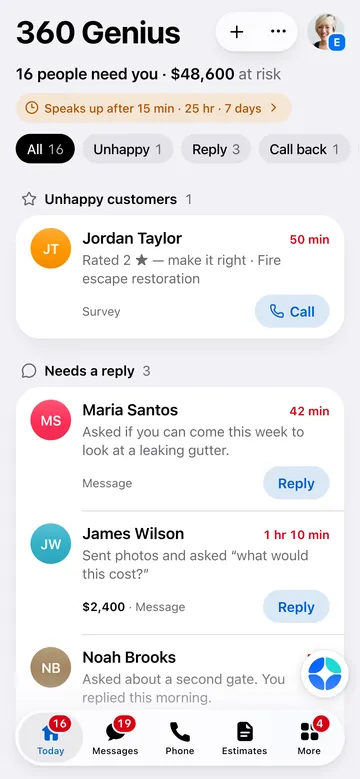
Who needs you today, and the money at risk.
An AI team that works
Six teammates price, follow up, collect, schedule and earn reviews.
Built for 26 industries
Your trade's words, stages, documents and price book, ready.
A new lead, start to finish
Your AI team takes it from the first hello to the five-star review. You step in where it matters: the price, the yes, the unhappy customer.
0:00
Website form or chat, a call or a missed call, a text, WhatsApp, Google, Facebook or an AI assistant.
Under a minute · Lia
In the same channel, from your local number, with what to expect next.
Minutes later · Lia
She asks for photos and the details of the job. They reply right there, in the conversation.
Same day · Theo
He reads the photos, finds similar past jobs and uses your price book. Good, Better and Best when it fits.
One tap
Check it and send with one tap. Routine jobs can go out on their own, if you turn that on.
Next day · Sam
They book a 2-hour arrival window that follows your rules, or ask for sooner and you decide.
Day 3 to 14 · Max
Never more than one message a day, and he takes no for an answer. It stops the moment they sign.
Signed
Updates at every stage. Change orders are priced and approved by text.
Job done · Nina
The invoice goes out and gets paid by card or bank, or over time.
After the job · Ana
She asks happy customers for a review and turns the before and after into a Job Story.
Next
Every happy customer brings the next one.
Customers notice how fast and professional you are. That's how you close more.
No demo call. Sign up and start today.
Example with fictional data
Estimates
Branded, clear and signed on the phone, with the contract and the deposit in the same tap. Every estimate works as your best salesperson.
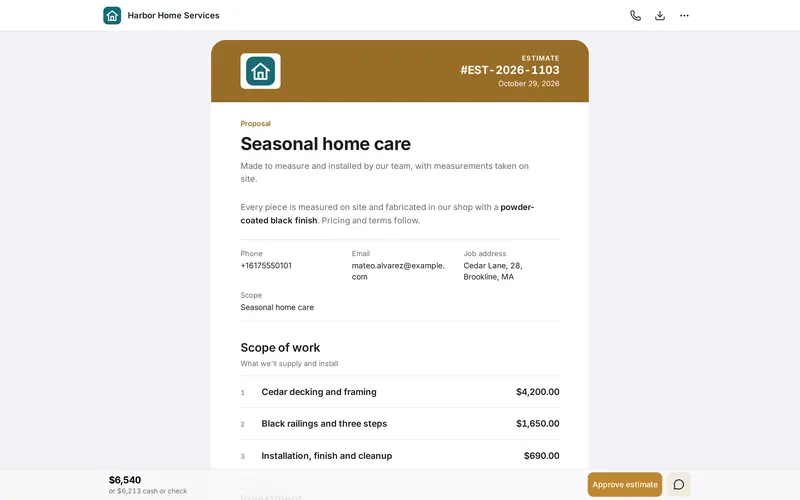
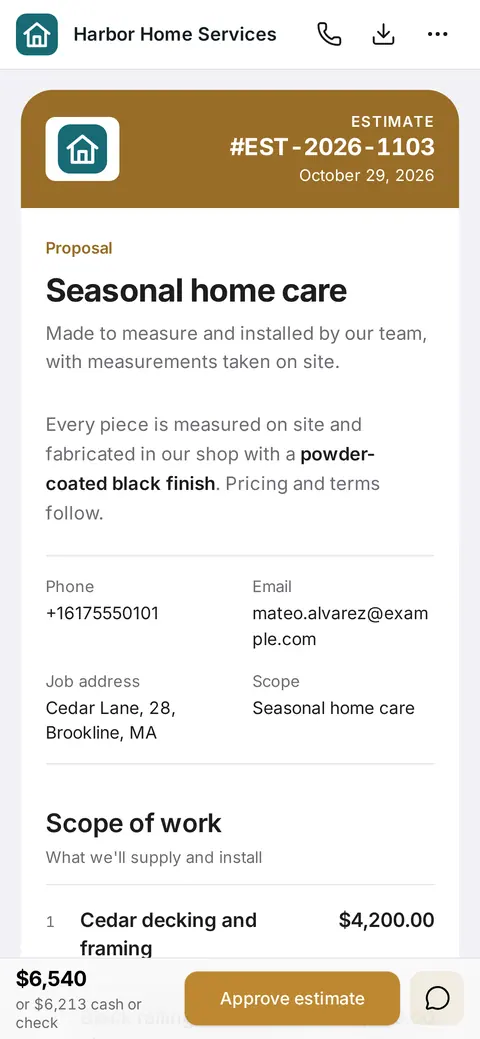
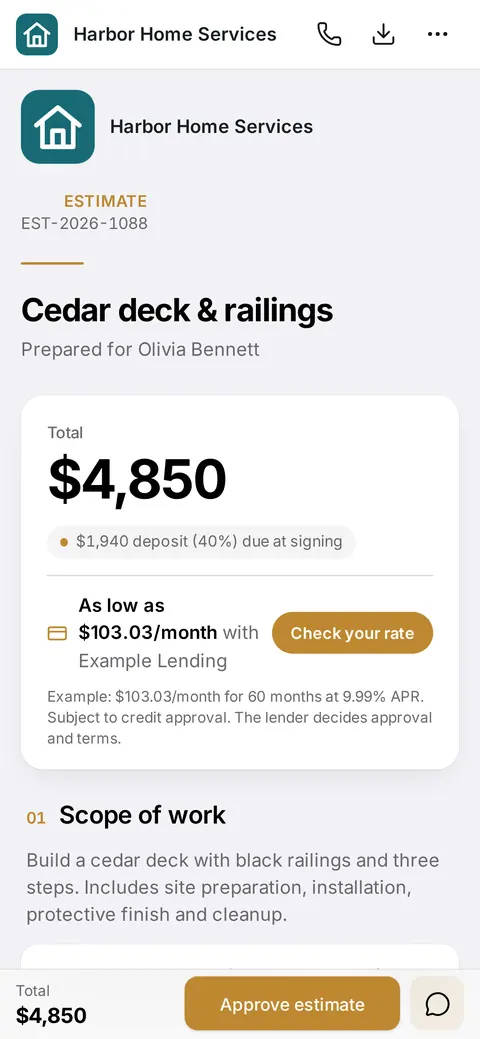
Signed on the phone, deposit and monthly payment included
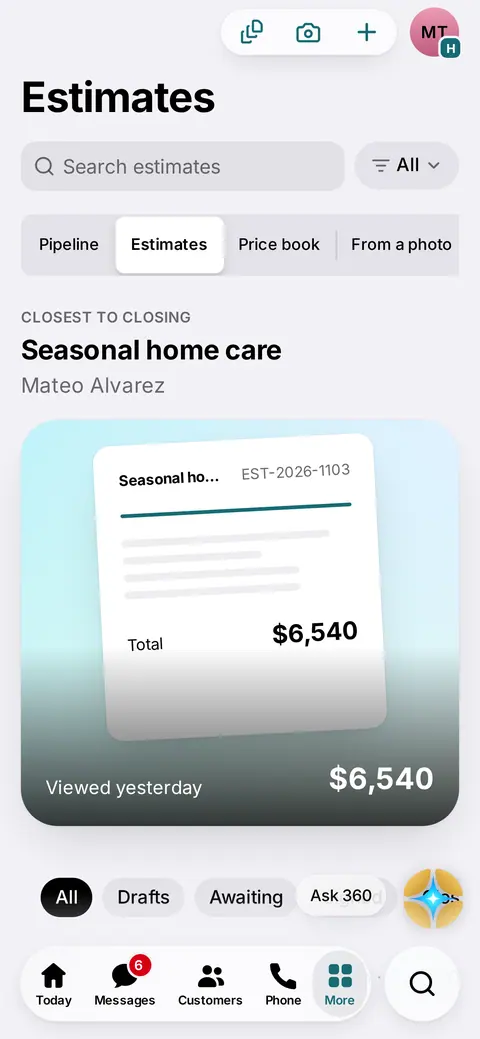
Know who opened it and who's closest to yes
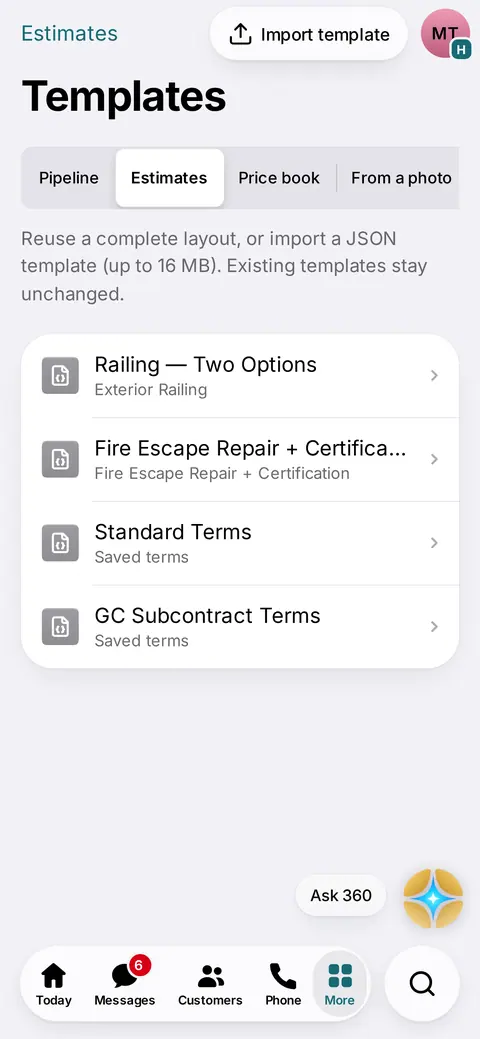
Templates, terms and contracts, ready to reuse
Options side by side, each with its monthly payment.
Show the job, the finish and the drawing right in the estimate.
Say what you saw. Theo turns it into priced lines for you to check.
Your prices, and a warning before you send below your target margin.
They sign with a finger, anywhere. You get the signed copy.
Your terms and contract go with the estimate and are signed together.
Card, bank transfer or pay over time, the moment they say yes.
Priced, approved and added to the job without a meeting.
See the moment it's opened. Max follows up until they decide.
A clean PDF every time, in the style that fits your brand.
No demo call. Sign up and start today.
Money
AI does the bookkeeping grunt work. You see the truth about your money every day.
Nina, your billing teammate, keeps it all in order.Money out is part of All-in
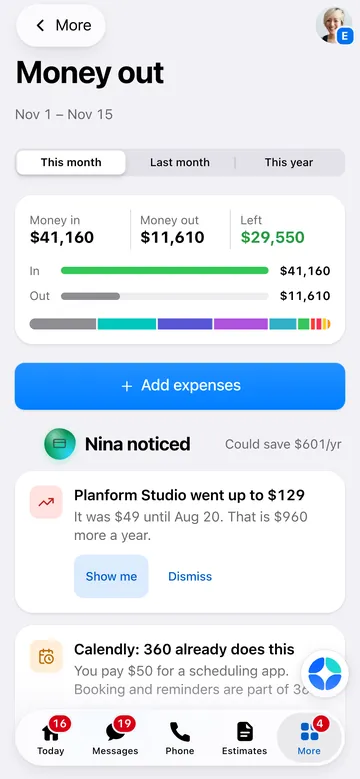
Money out: what's in, what's out, what's left
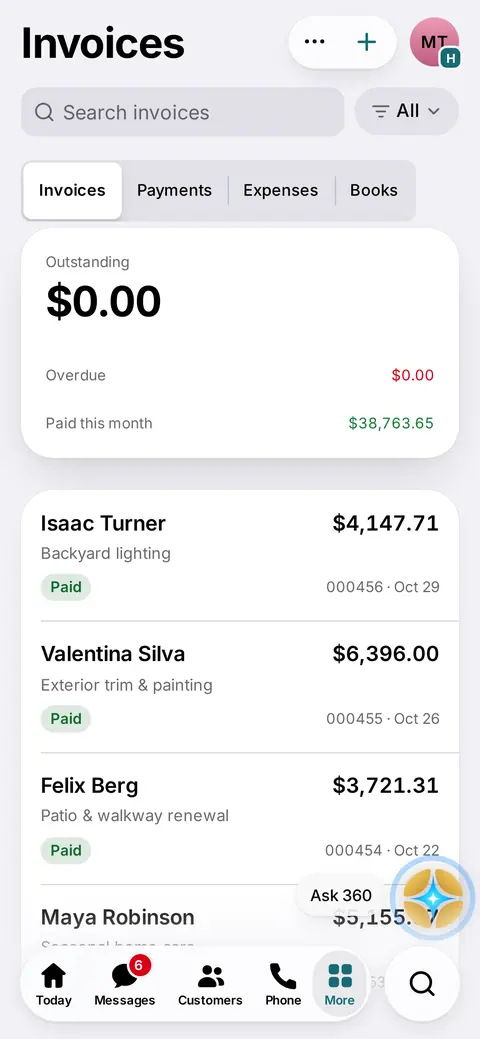
Invoices and payments, with what's paid and what's late
Forecasts and audit figures are estimates; confirm audits with your insurance agent. Reading your statements and receipts never moves money.
No demo call. Sign up and start today.
Depth
Not a contact list with AI on top. 360 follows the whole job, from the first call to the review, and knows the details of your trade.
Why it works
 360
360 gives AI a home inside your business: trained on your work, guided by your rules, and focused on one thing, closing more customers.
You stay in charge of what matters: prices, discounts and unhappy customers always come to you.
Your team
Each teammate is more than a name. They have a job, their own tools inside 360, your rules, a voice you can talk to, and they get better every week.
Front desk
Uses
You control
Your hours, your booking windows and what she's allowed to promise.
Pricing & Proposals Director
Uses
You control
Every price. Nothing goes out below your margin without you.
Sales & follow-up
Uses
You control
Discounts always ask you first, and he stops the moment they say no.
Billing
Uses
You control
What gets charged, and when. Anything that costs money waits for your OK.
Office manager
Uses
You control
Who goes where, and which settings he may change when you ask.
Reputation
Uses
You control
Unhappy customers always come to you first. She only asks happy ones for reviews.
Your daily coach
Uses
You control
When it speaks up, and what counts as urgent for you.
No demo call. Sign up and start today.
Not an AI wrapper
We have been building 360 nonstop for 5 years. Hundreds of businesses ran their days on it in beta, and every rough edge they found made it better. The AI sits on top of a real business app, not the other way around.
 King Iron WorksCustom ironwork · Boston, MA
 Innovate BuildingRemodeling & ADUs · Massachusetts
 EDX PoolsPool remodeling · Boca Raton, FL
 Affordable Pool RenovationPool renovation · Florida
 Prime Pools and SpaPools & spas · Orlando, FL
 Elevate KitchensKitchen cabinets · Nationwide (MA & FL offices)
 Alfa InoxStainless & ironwork · Belo Horizonte, Brazil
Results
Real numbers from their own 360 accounts. Counted, not estimated, and never rounded up.
King Iron WorksLast 90 days
Alfa InoxLast 90 days
Counted from each business's 360 account on November 15, 2026. They moved to 360 in October 2026.
Nothing to hide
Sign up and start today. We and your AI team set 360 up with you, so it becomes your business's best asset.
360 was built for one thing: helping you close more customers.
Included. Ask 360 walks you through it and changes any setting for you, and our team is a message away.
$499 once. We import your customers and prices, set up your number and team, and train your crew.
Tap through one week at a fence company. Every step is something 360 does today.
Tue 9:47 PM
Thu 10:40 AM
Sun 9:00 AM
Sun 9:06 AM
Sun 6:00 PM
Wed 5:30 PM
One app did all of that. You made two decisions.
Example business and customer. Lia is part of All-in; every other teammate is in both plans. Texts and calls are pay as you go.
Calls in one app, estimates in another, invoices in a third, reviews in a fourth, the schedule on a calendar and follow-ups on a spreadsheet. Every switch is a customer you forget. 360 puts it all in one place your whole team shares.
| What you need | A popular app | Its list price | In 360 |
|---|---|---|---|
| Phone & voicemail | Quo (OpenPhone) Starter | $19/mo · per user | Included |
| Estimates | Jobber Core | $49/mo · 1 user, no commitment | Included |
| Expenses & receipts | QuickBooks Online Simple Start | $38/mo | Included |
| Calendar & booking | Calendly Standard | $10/mo · per seat, billed yearly | Included |
| Reviews | NiceJob Starter | $95/mo | Included |
| E-signatures | DocuSign Personal | $11/mo · 1-year term | Included |
| Texts, calls and AI | Other apps: Each app sets its own allowances and per-use prices | 360: Pay as you go at our published prices | |
| Your team | Other apps: Phone and booking apps charge per person | 360: Unlimited users | |
| Six apps, one person | $222/mo | Essentials $79/mo | |
List prices from each company's own pricing page, checked November 15, 2026, monthly billing unless noted, before taxes and promotions. Your stack may cost more or less. Using QuickBooks for your books? Keep it: 360 connects to it.
All-in
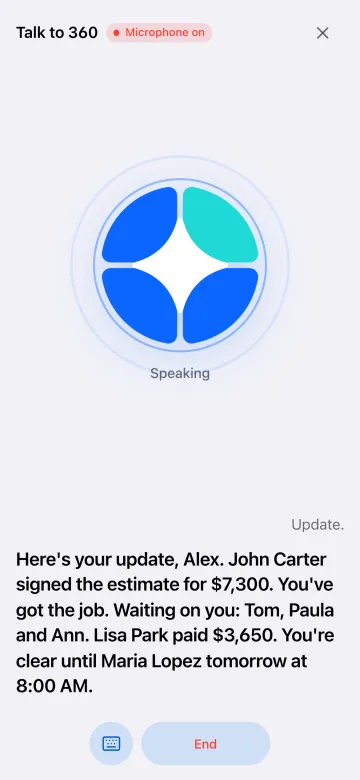
Talk to 360 hands-free from the truck. Hear your update, then reply, book or send by voice. 360 reads back anything that goes out and waits for your yes.
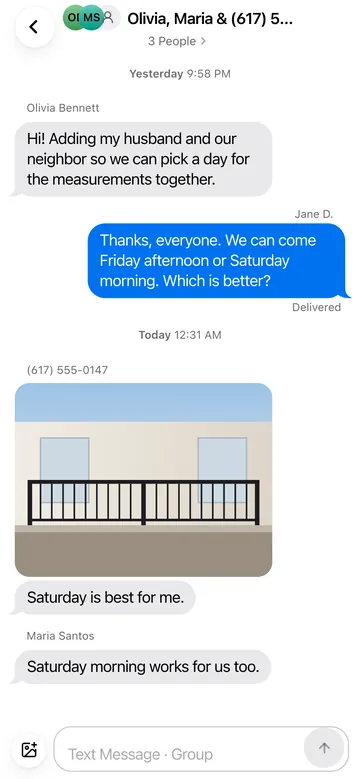
Group texts from your business number with customers, partners and crew. Everyone sees the same conversation, and it stays on the customer's record, not in someone's personal phone.
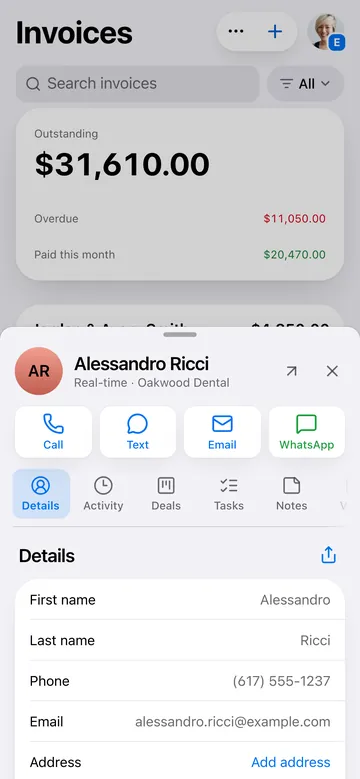
Tap a customer, estimate, invoice or job anywhere and its card opens right on top, with everything related, both ways. Call, text or pay without hunting through tabs.
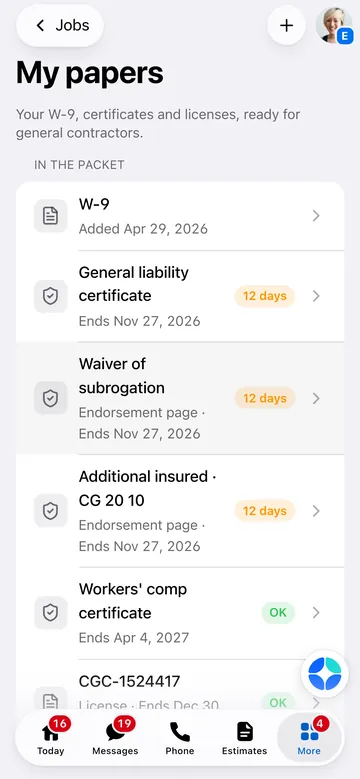
Collect W-9s, insurance certificates and lien waivers from subcontractors with one link, see who's missing what before you pay, and send your own packet to general contractors in a tap.
Dramatizations. App screens are real.
A missed call gets a text back, so the conversation can continue.

Turn job details into an estimate draft before the work follows you home.

Keep customer follow-ups from slipping through the cracks.

Give callers a way to reach you while you’re on the job.
Your whole team, every teammate except Lia, and every tool on Essentials. All-in adds Lia, Talk to 360, Money out and insurance audit tracking.
$99 $79/mo
Black Friday price, locked for life
or yearly $799/yr
Theo, Max, Nina, Sam and Ana, every tool, unlimited users.
$199 $179/mo
Black Friday price, locked for life
or yearly $1,799/yr
Everything in Essentials, plus Lia, Talk to 360, Money out and insurance audit tracking.
Done-for-you setup, $499 once. Stress-free: we import your customers and prices, set up your number, texting registration, team and templates, and train your crew. Your business will run beautifully from day one.
Prices per business in USD. Texts, calls, AI and phone numbers are pay as you go from a prepaid balance ($50 recommended).
See how the team works for businesses like yours.
Why 360
We covered it all — one app that truly does it all.
Try it free. You'll love it.
A card is required to start. Your plan is charged on day 15 unless you cancel before then, and you can cancel anytime in Billing. Usage you turn on, like a phone number, can be billed during the trial.
No. Monthly plans are month to month. Yearly plans are paid up front with 2 months free and simply don't renew if you cancel.
Yes. Export your customers as a CSV or Excel file and import them in minutes; transfer your business number or start with a new one. 360 connects to QuickBooks if your accountant wants the books there. Or choose the $499 done-for-you setup and we move it all for you.
You decide. Each teammate is a switch with its own settings. Estimates are drafts until you send them, Talk to 360 reads back anything before it goes out, and anything that costs money shows the price and waits for your approval.
Yes. The app, the pages your customers see and support are in English, Spanish and Portuguese. Each person picks their language; each business picks the one its customers see.
Usage: texts, calls, AI voice minutes and phone numbers are pay as you go at the published prices, up to a monthly cap you approve. Users and industry packs are never extra.
Start free for 14 days. Import your contacts tonight and wake up to answered leads.
No demo call. Sign up and start today.
Explore the tools for the work in front of you.